AI coding assistants now make up 5 to 10 percent of cloud spend at some enterprises. Here is where Claude Code token usage hides, where to find the data, and how to control it.
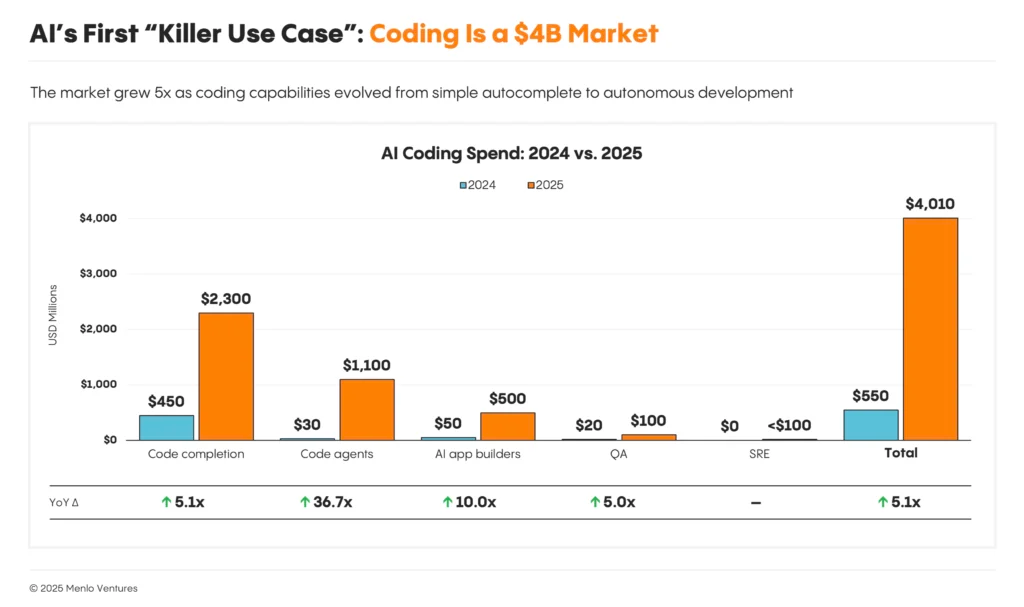
Enterprise spend on coding tools jumped from $550 million in 2024 to $4 billion in 2025. Coding is now the largest category of enterprise AI spending, and most AI spend management practices haven’t caught up. Anthropic reports that Claude Code averages about $13 per developer per active day across enterprise deployments, with 10 percent of users running above $30. Invoices show the total, but they can’t tell you which developer, which session, or which setting produced it. The time for a comprehensive strategy leveraging FinOps for AI spend management is now.
The token usage behind the bill rarely looks the way leaders expect. Most enterprises budget AI coding assistants by seat or track them as one line of model spend, assuming cost follows how much developers use the tool. Much of the bill actually comes from overhead no one sees: system prompts and expired caches that re-bill a session’s full history. But the data necessary to find that overhead already sits on every developer’s machine.
AI Spend Management Has to Go Below the Account Level
Account-level data gets you a certain distance. You can see spend rising on a model and consider a commitment to lower the unit price. But FinOps work always pushes toward specificity. Which team? Which application? With coding assistants: which user, and which of their 20 sessions that day?
“Like with everything else in FinOps, you start to get into why: why am I using that much? Why is it increasing?”
—Jon Thompson, CTO, Virtasant
The stakes are growing. For some of Virtasant’s customers, AI coding assistants often account for approximately 5 to 10 percent of total cloud spend. When we look below the account level, that spend is often dominated by a small share of users. Understanding how those people work, and what value they get, becomes the main focus of AI spend management.
Virtasant CTO Jon Thompson recently demonstrated how to find those answers on The Keys to AWS Optimization with Steph Gooch of AWS, after they got talking at a London FinOps meetup. In the episode, he runs Claude Code through Amazon Bedrock and pulls apart where the tokens go.
Below, we cover the three hidden costs that showed up, where the data to find them lives, and the controls that keep them in check.
Three Hidden Costs in Claude Code Token Usage
Fixed overhead
Before a developer types anything, the model receives a long set of instructions telling it who it is and how to behave. In Jon’s demo, that system prompt and related context ran to roughly 30,000 tokens. Every prompt re-sends it along with the full conversation history, because no GPU sits stored in memory with the conversation.
Prompt caching keeps this affordable by reusing content the provider has already seen. At current rates, a cache read costs 10 percent of the normal input price, while a five-minute cache write costs 1.25 times the normal price. A miss costs more than 12 times as much as a hit on the same content.
The cache clock
Caches expire. When they do, the next prompt pays the write rate on everything that came before. In Jon’s demo, a simple question cost 2 cents with a warm cache. Minutes later, an equally simple question cost about 12 cents because the cache expired.
How long the cache lasts depends on your setup. On a Claude subscription, Claude Code uses a one-hour cache for usage inside the plan, then drops to five minutes once a user draws on usage credits. On Amazon Bedrock, the default is five minutes unless you change the configuration. Longer sessions make it worse. Each miss re-bills a larger history than the one before.
Tools waiting in the wings
MCP servers give an assistant access to outside tools, and everyone at FinOps X seemed to be launching one. The catch is that a tool costs tokens just by being available. In Jon’s demo, two small MCP servers that were never called nearly tripled the cost of a simple prompt, from 2 cents to almost 6. Anthropic’s documentation notes that a typical five-server setup can carry about 55,000 tokens of tool definitions before Claude does any work.
At scale, this quickly turns into a budget line. Picture 1,000 users running 10 sessions a day, with 10 cents of tool overhead per session. That’s about $1,000 a day on tools nobody used. Some organizations make it worse with standardized central configurations that load every approved server for every developer.
Claude Code now defers MCP tool definitions by default, which helps in this case. But the broader lesson holds: You need to see what is consuming context behind the scenes, and keep checking. These tools change quickly, and last month’s best practice may already be out of date.
“Let’s say you’ve got 1,000 users, 10 MCP servers, and it’s costing you even 10 cents extra every session. You multiply that up … that’s actually a big cost every day.”
—Jon Thompson, CTO, Virtasant
Where the Token Usage Data Already Lives
You don’t need a new AI spend management platform to start: the data already exists at three levels.
- The Session View: The “/usage” command in Claude Code breaks a session into input, output, cache reads, and cache writes, with an estimated cost at list price.
- The Forensic View: Claude Code writes each session to a local file that records token counts per prompt, the tools available, and the system prompt. In the above video, Jon had Claude compare two sessions prompt by prompt. If you run that analysis often, have Claude write a reusable script so you aren’t spending tokens on the analysis itself.
- The Fleet View: This covers everything. OpenTelemetry is an open standard for collecting system metrics, and most AI coding tools support it. For teams on Bedrock and other cloud providers, OpenTelemetry is one option that streams per-user token and cost metrics into your own systems in near real time.
It’s worth noting that the problem extends beyond Claude Code. In the video, Steph mentioned that Kiro, another AI coding assistant, warns her when she has too many MCP servers enabled.
Pulling these three views together is where most teams stall. Virtasant manages billions of dollars in cloud spend and is building this kind of developer-level visibility with customers now: talk to the team about where your AI coding spend is going.
Deciding what to capture
By default, OpenTelemetry exports leave out prompt text. Capturing it gives richer analysis but raises the same questions as any business data. For pure coding work, the answer is usually manageable. The trouble is that the lines blur. A developer mostly uses the assistant for code, then one day asks it to debug an issue using real customer data.
Clear separation of duties helps. (If developers have no access to production data, the risk drops.) Either way, the decision belongs with the people who already govern how your organization handles business data.
What Leaders Should Put in Place
Effective AI spend management comes down to awareness and habit, supported by a few one-time configuration changes.
- Scope MCP servers to projects. Load the servers a project needs in that project’s configuration, keep the global configuration lean, and review any central configuration that pushes the same tools to everyone.
- Set session norms. Keep sessions short and focused on one task, and batch related prompts inside the cache window. Set the cache lifetime intentionally, too. For interactive work, a one-hour cache often beats five minutes because developers step away between prompts. Know the trade-off: a one-hour cache write costs twice the normal input price, so the writes you still pay for cost more.
- Check model choice. We’ve seen users running Opus for 100 percent of their work. Some tasks need that power. But many don’t, and Sonnet handles much of everyday coding at a lower price.
- Baseline a pilot group. Do this before a wider rollout, as Anthropic itself recommends, then build a forecast. If finance can get one number from engineering next quarter, make it forecast spend tracked against actuals. Once that discipline exists, AI spend management can move to return on investment. One practical way to measure that return is to estimate the extra headcount you would have needed to deliver the same work without AI.
- Make reported costs match the bill. Claude Code calculates cost at list price by default. If you pay contracted rates, an administrator can set those rates in managed settings so the numbers developers see match the invoice.
- Show developers their own spend. Keep the tone collaborative. Nobody wants to feel policed for using a tool the company asked them to adopt. A culture where engineers share tips and treat AI spend as something everyone is still learning will do more than any policy memo.
Your First Move in AI Spend Management
We’re all in learning mode with these tools, and the guidance keeps shifting as they evolve. That’s an argument for starting now, while developer habits are still forming.
“Tools continue to evolve at a rapid pace. What were best practices or gotchas last month might no longer apply.”
—Jon Thompson, CTO, Virtasant
Before your next leadership meeting, ask your engineering lead one question: Can the team name its ten most expensive developer sessions from last week and explain why each one cost what it did? If the answer is no, AI spend management in your organization may begin with one developer’s session files.
And if your team can’t answer that yet, Virtasant can help. We work with enterprises to trace AI coding spend to the users, sessions, and settings behind it, then build the forecasts finance needs.
Why is AI coding assistant spend difficult to manage?
Invoices show total spend by model, not which developer, session, or setting produced it. A large share of the bill comes from overhead developers never see, such as system prompts and expired caches that re-bill a session’s full history. Spend is also often concentrated in a small share of heavy users.
How does prompt caching affect Claude Code costs?
Claude Code caches the start of each conversation so it can reuse it cheaply. A cache read costs 10 percent of the normal input price. When the cache expires, the next prompt pays the higher write rate on the full history, which can cost more than 12 times as much.
Do MCP servers increase token usage even when they aren’t used?
Yes. Each enabled MCP server adds tool information to every session, even if the developer never calls it. In a live demo, two small unused servers nearly tripled the cost of a simple prompt. Claude Code now defers full tool definitions by default, which reduces but does not remove the overhead.
Where can enterprises find Claude Code token usage data?
The data sits at three levels. The /usage command shows a single session’s tokens and estimated cost. Local session files record per-prompt detail for forensic analysis. OpenTelemetry streams per-user token and cost metrics into an observability stack, and it is the main per-user option for teams on cloud providers like Amazon Bedrock.
What should a CFO ask engineering about AI coding spend?
Start with a forecast of AI coding spend tracked against actuals. That builds the discipline every other step depends on. Once forecasting is in place, move to return on investment. One practical measure is the extra headcount the organization would have needed to deliver the same work without AI.


.svg)