
Enterprise Vibe Coding: What Works And Where To Start
Vibe coding promises to transform software development, but enterprise success requires the right approach. Learn how to start small, build context, and integrate AI tools effectively into your SDLC.
Vibe coding in enterprise environments requires careful human oversight and works best when treated as an assistant rather than full automation.
Organizations should start small with AI-enabled IDEs and internal tools before expanding scope, creating test groups to document best practices.
Breaking down the software development lifecycle into smaller, verifiable steps yields better results than assigning AI large black-box tasks.
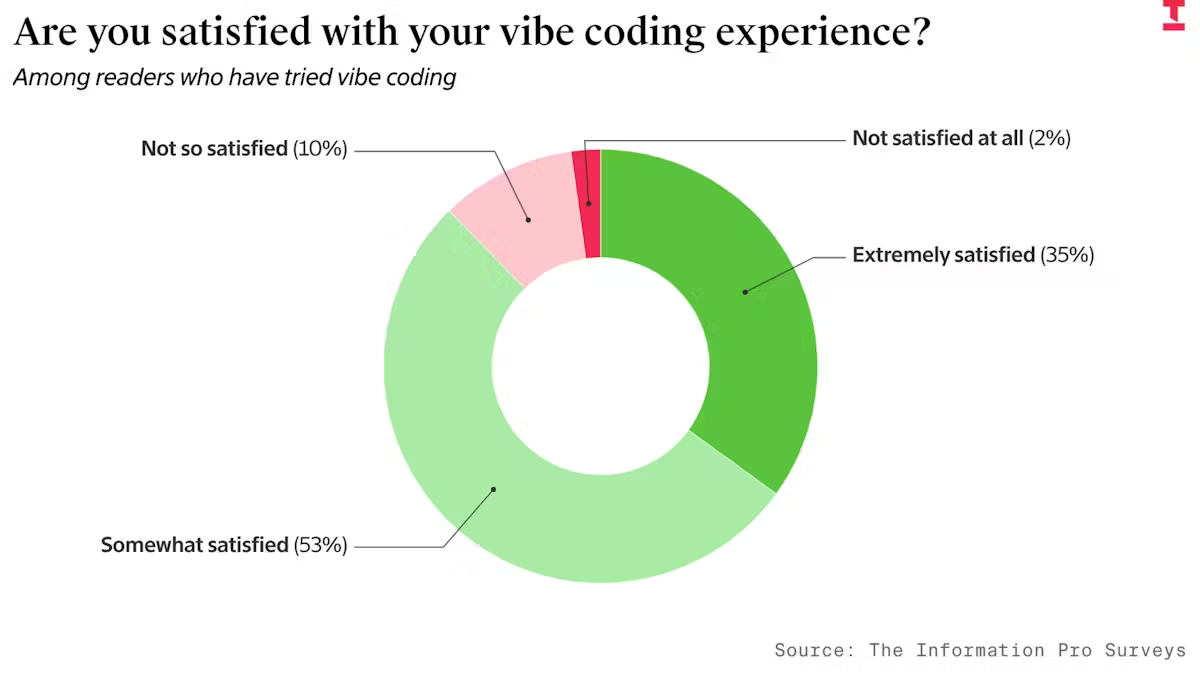
A few weeks ago, I was at WebSummit in Lisbon and gave a presentation on vibe coding. It was a hot topic at the conference, and in recent months, you’ve probably seen many articles about it in the press. Some say how great it is, the way of the future. Many aren’t so sure — a 2025 survey from The Information found that more than half of people who try vibe coding are only somewhat satisfied by the experience. Others say it’s a failed experiment.
At Virtasant, we help some of the largest organisations in the world to build applications, and we build our own apps to enable us to deliver services. We’ve learned a lot about how this rapidly evolving field is changing the way organisations work.
Here is our take on what vibe coding is for, where to start, how it changes the software development process, and how you can find success with it in the enterprise.
What is Vibe Coding?
At its simplest, Vibe Coding is about using AI to produce working software from a natural-language description.
The term was coined by OpenAI co-founder Andrej Karpathy in February 2025, with Collins Dictionary naming it Word of the Year. He talked about "forgetting that the code even exists." However, Karpathy also noted that it is "not too bad for throwaway weekend projects."
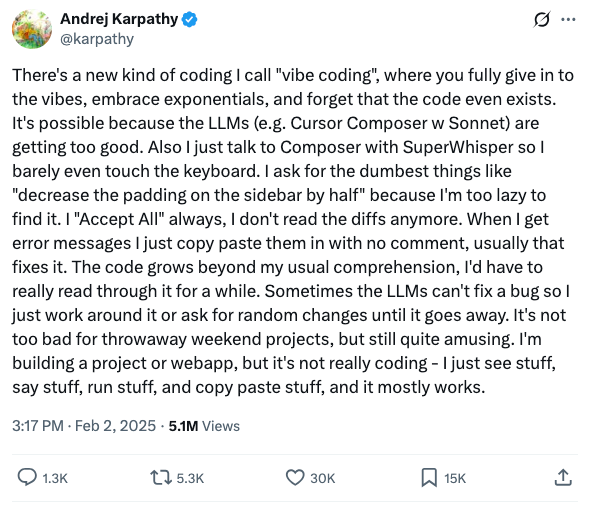
If you’re reading this, you likely aren’t just building throwaway weekend projects. But the underlying idea of using AI tools to automate parts of the software development process can be effectively applied to real-world, enterprise-level projects with the right approach.
1. Think About Scope
The first thing to consider is that you can take the "natural language in, code out" idea as far as you like.
- You could ask for something simple: "Write me a function called divide with parameters x & y."
- Or you could be ambitious: "I want a web app that allows people to find the nearest place to buy Pastel de Nata (a Portuguese egg custard tart pastry) and rate them" (I became a bit obsessed with Pastel de Nata while I was in Lisbon!).
The broader the scope, the more challenges you hit. But even the trivial "divide" example highlights some of those challenges.
If we consider it for a moment:
- AI outputs some code, but does it run? Does it do the right thing?
- What about edge cases? I didn’t even tell it what to do if y is zero.
I asked a few different models to write the divide function, and their handling of the zero case varied:
- Gemini 2.5 Pro returned a string with an error message, which is probably not what I want in a numeric function.
- Claude Sonnet 4.5 had no specific handling, but the docstring mentioned that it would raise the native Python ZeroDivisionError.
- GPT 5 said nothing about it at all.
And that’s an example of the importance of both context and model selection.
Context Matters
Context is the most important factor in getting good results. An AI tool might know how to write code. But does it understand your business problem? Your environment? Your non-functional constraints like performance and resilience? Your coding standards?
It’s like bringing a new team member on board. However experienced they are, there’s a learning curve. They might have experience from another org, even in a similar domain, but they don’t know all the things that make your world special.
It’s like Pair Programming
Revisiting Karapthy’s “forgetting that the code even exists” point: You can do a lot to help AI produce what you want. But at least given the current state of maturity, you have to think of it as pair programming (a common technique in which developers work together at one workstation).
AI saves you time. It produces something which could be good. But a skilled human (perhaps aided by some other AI) needs to verify it. Often it’s iterative. And from what we’ve seen, a lot of the time it’s like delegating to a smart but inexperienced developer.
2. Start Small
Don't try to get AI to deploy a complete working system from a high-level requirement on day one. Start small.
AI-enabled IDEs
The obvious entry point is an AI-enabled Integrated Development Environment (IDE) that combines the tools needed to produce code in a single application. IDEs fit into the current way of working and get people used to using AI. Popular choices include Cursor, Windsurf, and Copilot in VSCode.
How you introduce these kinds of tools is equally important, and granting developers universal access can be chaotic. In enterprise environments,, we have seen distinct adoption personality patterns that you need to watch out for:
- The Middle Ground: They are told to use the tool, so they generate code and commit it without really checking it. Eventually, QA finds that it’s way off.
- The Skeptic: This is the seasoned developer who tries it once, sees it fail, and decides "it'll be quicker if I just do it myself." They continue working exactly as they always have.
- he Enthusiast: They have drunk the Kool-Aid. Now that they have a hammer, everything looks like a nail. They use AI to extremes, having fun but actually becoming less productive.
What often works is to create a “test group.” Identify a small number of developers (perhaps a mix of skeptics and enthusiasts), give them extra time to learn, and have them document the patterns and shared context that work for your organization.
Project Types
We’ve found that Internal Tools are a great place to start. Good developers are natural toolsmiths who hate repetitive work. They write tools to make their own lives easier. These projects are safer because the developers know the requirements inside out and will be the ones using the final result, so they immediately know if it’s working right.
We recently had a case where an engineer needed to analyze MySQL query logs (essentially database access records that assist with debugging and monitoring) and apply application knowledge to solve a performance issue. Instead of doing it manually or writing a tool by hand, they used AI with a focused prompt containing the relevant context. Within a few hours, they had a working script.
In another example, a team needed to refactor a complex data pipeline involving 50+ files. Interdependencies between jobs (A+B can only run if C has completed, etc.) made manual testing a pain. So they used AI to create a job runner that understood these dependencies and could test everything in the correct order. They had a working system in 30 minutes—quicker than a single manual test run.
Prototypes are another good candidate for early usage. In this instance, you can even consider applying AI to a broader scope: just give it the business problem and ask for a working app. This can be a very effective way to get product ideas out for discussion, instead of wireframes or slide decks.
You need to be careful, though, that these prototypes will be a long way from production code. Set expectations accordingly or you may find yourself in a “this looks great, can we release it on Monday?” situation.
3. Broadening Scope
Testing
Once you have the basics down, where do you go? A common next step is Testing.
You have the code, so it’s tempting to say, "write me the test code." The problem is that reviewing a wall of generated test code is difficult, and it encourages blind trust.
Instead, break the process down:
- Ask the AI: "What test cases would you write for this, taking into account edge cases and performance?"
- Review and iterate on those human-readable test descriptions.
- Only once you are happy with the cases, ask the AI to write the code to implement them.
As you broaden the scope of vibe coding within your organization, model selection becomes an increasingly important consideration. One model is really good at understanding problems and generating test cases. A different one might be the best choice for writing the code. This can also have cost benefits — you might use the more sophisticated (i.e., expensive) models only where needed.
Breaking Down the Remainder of the SDLC
This approach—breaking large black-box tasks into smaller, verifiable steps—applies throughout the Software Development Life Cycle (SDLC).
For example, let's start with requirements. Rather than asking AI to write a detailed requirements doc in one go, we could ask it to create a screen mockup and then iterate on it. Once that’s in good shape, perhaps we can ask it to list out use cases for how the screen should work and iterate on the details. From there, maybe we ask about the implementation: What changes are needed to the data model? What components of the system need to be changed and how?
We can continue this in small steps until we get to the point of being ready to write code.
In a traditional, rigorous SDLC, these were individual steps with owners and reviews. These days, they’ve been compressed in many organizations, sometimes with no formalized artifacts.
AI tools are getting better at taking multiple steps in a single go. The more advanced “reasoning models” do this: If you watch the output, you’ll see a real-time explanation of how it’s breaking the problem down.
We at Virtasant still see greater success in splitting the steps, or at least asking for interim outputs (artifacts), so you can review them. Even if the vibe coding tool gets it right, it lets you see what the “black box” is doing. Through this process, you also learn how to be more effective with your prompts and context. You learn to second-guess where the AI is likely to go wrong.
You should formally update your process to include these review points. You’ll also find that these artifacts—like technical designs or test plans—are incredibly valuable for anyone (human or AI) maintaining the system in the future.
Looking Forward
Vibe coding will continue to evolve and become pervasive across engineering teams, and AI tools will improve at handling workflows. But for now, the most effective approach is incremental. Start with AI-enabled IDEs and projects, such as internal tools, break complex tasks into verifiable steps, and build the context and patterns that work for your specific environment. With the approach outlined above, you can improve team productivity while maintaining the quality and rigor enterprise applications demand.
.avif)


.svg)


_0000_Layer-2.png)

